Scalar Dirac equation, and numerical considerations
Table of Contents
Preliminaries
Questaal codes normally solve the Dirac equation in a scalar relativistic approximation for partial waves inside the augmentation spheres, though some parts of the code (mostly ASA codes) have extensions to the full Dirac equation.
These integrations are performed numerically on a discrete radial mesh. Usually you don’t need to worry about how integrations are carried out; for the most part Questaal takes care of the numerics pretty well without you needing to delve into the details. If you are having an issue and looking for a quick fix, include the RSEDEF token in your ctrl file as explained below.
There are details that at times can be important, (occasionally the integrators can trip up or be a little inaccurate), which this page documents.
Scalar Dirac equations
The scalar relativistic approximation reduces the four component Dirac equation to two components (or two pairs of components in a spin polarized case). The spin orbit coupling that connects the two pairs can be included perturbatively and has a structure of the form . The two components consist of a large component and a small component . In a spherical potential the two satisfy these coupled equations
where
is the speed of light, is the energy, is the nuclear potential (in Ry, the units Questaal uses) and the external potential. Note that the partial waves have an quantum number, but the index is suppressed.
Boundary Conditions near the origin
A second order differential equation (or two coupled first order ones) has two solutions, one regular at the origin and one irregular. On physical grounds the solution must be regular at the origin, and for the scalar Dirac case the behavior at the origin is defined by
Boundary Conditions at the augmentation radius
We are left with one free boundary condition. For the free atom, there is a physical requirement that the wave function is normalizable, which requires the solution decay as . Solutions that are regular both at the origin and at occur only at discrete energies ; this is how the quantization condition manifests itself.
In the solid with an all-electron method, the partial waves are evaluated only up to a “muffin tin” radius (aka augmentation radius) , and joined to envelope functions there, which for Questaal are smoothed Hankel functions, jigsaw puzzle orbitals, or possibly plane waves. The partial wave must join smoothly and differentiably to the envelope function: matching value can always accomplished by normalization of the partial wave, but to match the slope (or logarithmic derivative, ) is valid only for a particular . Thus we have freedom to choose either or , and there is a 1-1 correspondence between the two. (More precisely there is a multiplicity of energies for a given , each with a different number of nodes : there is a 1-1 mapping between and the () pair.)
Solving the Dirac Equation on a Radial Mesh
and must be integrated numerically on a radial mesh. Usually this is handled fairly well with internal defaults. The default legacy implementations has been modernized in several ways, which you can apply as a bundle by adding OPTIONS_RSEDEF=0 to your ctrl file.
The following explains the process in more detail, together with the modernizations available.
and will oscillate very rapidly for small where they must be orthogonalized to core levels; thus meshes are typically logarithmic. Questaal uses a modified form: a shifted logarithmic mesh. For points , the mesh is
Since must be the augmentation radius, there is only one degree of freedom in the choice of and .
When is small compared to unity the are linearly spaced, with spacing ; as increases it smoothly turns into a logarithmic mesh where is constant.
To control stability, several overlapping considerations must be taken into account.
When is much larger than unity, the mesh is logarithmic with fixed . If is too large, the integration near the augmentation radius is inaccurate.
When is small compared to unity the are linearly spaced, with spacing (i.e. ). If is too small, points are too closely spaced and the integrator becomes inaccurate.
In a linear method not only the partial wave , but its energy derivative , must be integrated. This can be solved by finding at multiple energies and differentiating by finite difference (what the legacy mode does), or by solving an inhomogeneous Dirac equation.
Core states with very negative decay exponentially with for large (think of the H atom). This is the classic instance of a stiff differential equation.
To address the stiffness issue, is integrated outward from the origin, and inward from to some central meeting point . The logarithmic derivative of the two solutions must match at , which is done by fixing and varying , or the reverse. It is a nonlinear problem either way, and either or must be determined in an iterative manner. (In the Questaal codes, usually is fixed and is varied. But there can be exceptions.)
Legacy and modern implementations
As for points 1, and 2, it has been found empirically that is quite reliable; this is the typical default value. (You can explicitly specify for a particular species in the input file.) is fixed by an internal formula (see subs/rmesh.f in the distribution). In the legacy code the formula was a simple function of the nuclear atomic number . However it can happen that is too small, especially when is small, and the mesh generator should adjust for this. In the legacy code this issue was not properly taken into account and choosing too small causes problems.
Regarding point 3, (actually the relativistic analog ) can be computed by finite difference at several energies, or by solving an inhomogeneous Dirac equation.
Input file switches controlling how the integrations are performed: the RSEDEF token
To preserve backward compatibility Questaal uses legacy algorithms, but it is generally more accurate to use some modern improvements to them. They are included as a bundle when you put RSEDEF=0 in the OPTIONS category of the input file.
It does three things: (1) replaces the legacy Numerov solver with a Runge Kutta solver, (2) solves with an inhomogeneous equation, rather than finite differences of the homogeneous one, and (3) safeguards against becoming too small, in effect setting OPTIONS_RBFAC=-1, as explained below.
To set options individually, see the following table.
| Operation | legacy code | alternative | Tag |
|---|---|---|---|
| solver | Numerov | Runge Kutta | HAM_RKRSE |
| finite difference | inhomogeneous Dirac equation | OPTIONS_NEPHD, 2nd argument | |
| modify | function of | possibly scaled so that is not too small | OPTIONS_RBFAC |
OPTIONS_RBFAC=1 is equivalent to the default legacy setting. It does not safeguard against becoming too small.
OPTIONS_RBFAC=fac > 1 reduces the total number of points, preserving the logarithmic spacing at large but increases the product by fac. It is not advised to choose fac as a positive number less than 1.
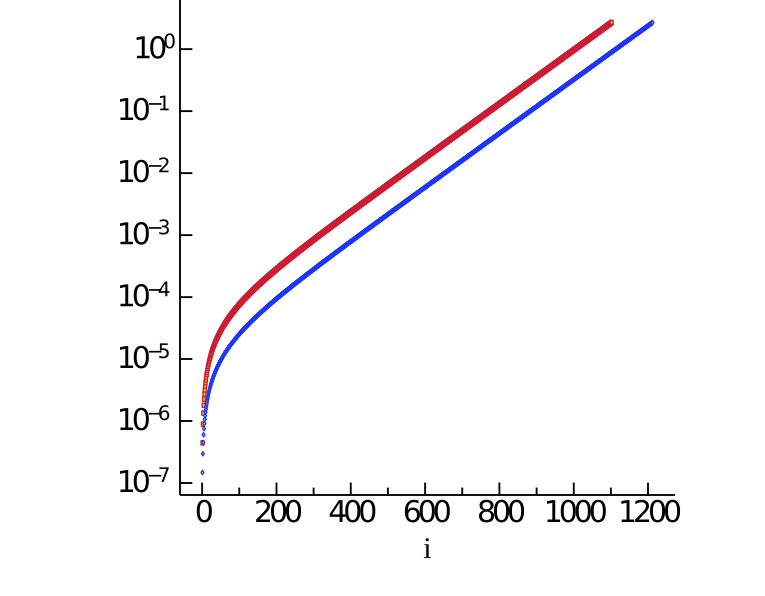
OPTIONS_RBFAC=fac < 0 adjusts by choosing a canonical default value for it, such that it scales as so as to keep the product fixed. OPTIONS_RBFAC=−1 is intended to be select a good default value of for a wide range of . The figure shows for Au with . The blue points are for the default mesh; the red ones were generated with OPTIONS_RBFAC=-1. The have the same spacing for large , but at small the blue points are more coarsely spaced, so initially increases more quickly with . The default mesh has 1212 points, while the red mesh has 1102 points.